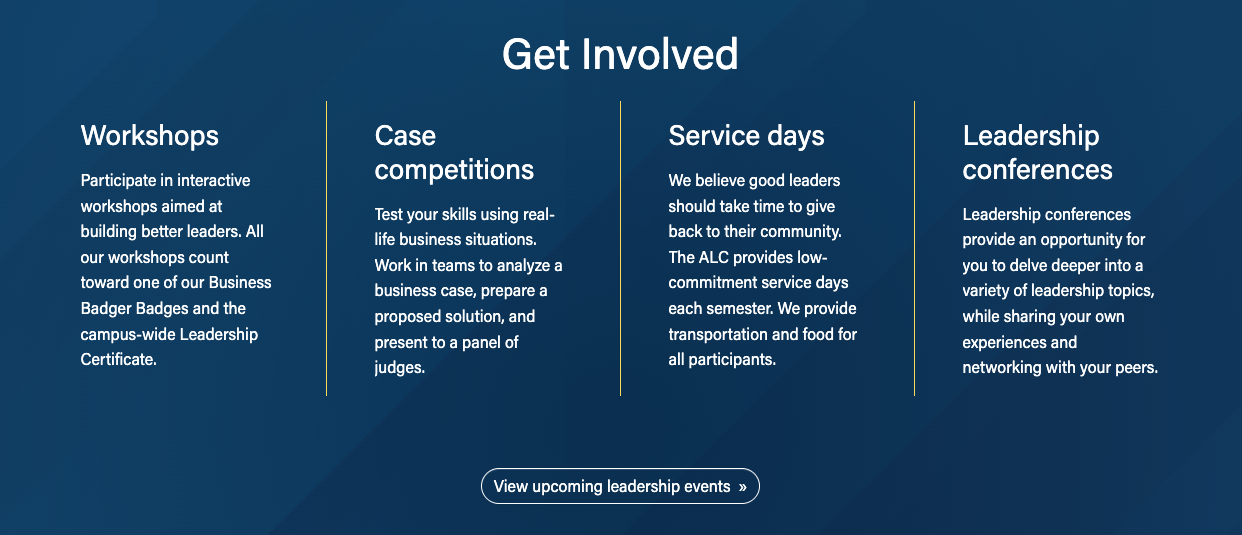
Also known as: borderless card, bare card, plain card, minimal card, shadowless card, sections with separators/dividers
Description
A block that groups short content into sections like cards, with no card outline or shadow. Used often at the top of program pages to introduce three important claims or differentiators.
Design
Use when
- Displaying multiple chunks of content with no supporting images. Common uses include:
- At the top of program pages to display 3 claims or differentiators
- At the bottom of a dept./center page to display "Contact Us" content or other CTA content
- A page already has lots of cards with outlines and shadows, to add visual interest
- Adding visual interest to a news story or Update magazine article
Editorial guidelines
Follow our general Web Copy General Guidelines in addition to the following:
Card titles/Subheadings (required)
- Keep each subhead limited to one short phrase
- Character limits:
- 1-3-column layout → ~45 characters max
- If not including any supporting text, the subheads can run slightly longer, 60 characters max.
- 4-column layout → 20 characters max
- Keep all subheads in the same row similar in length
Supporting copy (optional)
- Keep this copy short; one or two short phrases for each topic.
- Character limit: 115 characters max
- Keep all supporting copy in the same row similar in length
Design Assets Needed
- None - typically no assets are needed for this block
Implementation
Documentation updates in progress below
- Background options include no background, red pattern, blue pattern, gray pattern, and image. You can also select to display a yellow divider line between the cards.
- This block can be used in News or Update post pages. Be sure to check the Restrict Width checkbox in Configuration for these use cases. The xl column needs to be set to 0 if there is 1 card.
ACF Fields
Add/Edit Cards
Title
- Add the card title or subheading
Content
- Add supporting copy for the card.
- Images can be added to the content, but this is rarely done for this block.
- Upload the image to the WP media library and copy its URL; then add the URL to the text editor.
Link
- Add the URL and link text. The link will be styled as a primary button.
- Alternatively, links can be added via HTML in the Content section if you need a different button style.
- See Button Styles for commonly used styles.
- Add the link and your desired button style class
<a class="btn [insert-button-style-class]" href="[insert URL]">[Insert link text]</a> |
Fields for Introduction
Section Title
The main header will go in this field. You can change the title heading size.
The main header will be centered above the card, but in the same block.
Section Paragraph
Similar to Content in Fields for Add/Edit Cards. As with the Section Title, the content will be centered above the cards.
Fields for Footer
The footer as a content section, which is similar to the Introduction except it will be centered below the cards.
Footer CTAs
Links can be added to this field (or to the footer content) to be centered at the bottom of the block.
Additional Notes
The columns are automatically set at
Columns Default: 1
Columns Small: 0
Columns Medium: 0
Columns Large: 0
Columns Extra Large: 0
When Restrict Width checkbox is checked, the extra large column will need to be set to 0 if there is only 1 card. This will make the width of the columns match the article width.
When the Divider Line checkbox is checked, the columns should be as followed:
Columns Default: 1
Columns Small: 0
Columns Medium: 0
Columns Large: set to the number of cards in 1 row
Columns Extra Large: set to the number of cards in 1 row