
...
Note: the screen size at which it swaps between mobile/desktop is 645px wide screen. This is different from the breakpoint for when columns stack, which is 480px.
But wait... shouldn't "hide in desktop/mobile" be in sync with columns stacking?
If you'd like the mobile version of your element to appear at screens that are sized 480px and less (when all the columns stack on top of each other), instead of 645px and less, here's the fix:
- Go to the paintbrush icon in the left sidebar, and under "Advanced Styles" click the "Edit" button.
- Inside the additional CSS, paste in the following code, then click "Apply"
| Code Block | ||||||
|---|---|---|---|---|---|---|
| ||||||
@media (min-width: 480.2px) {
  .hide-in-desktop {
    display: none !important;
  }

  .hide-in-mobile {
    display: block !important;
    max-height: none !important;
    max-width: none !important;
    font-size: inherit !important;
    min-height: auto !important;
  }
}
|
| Expand | ||
|---|---|---|
| ||
|
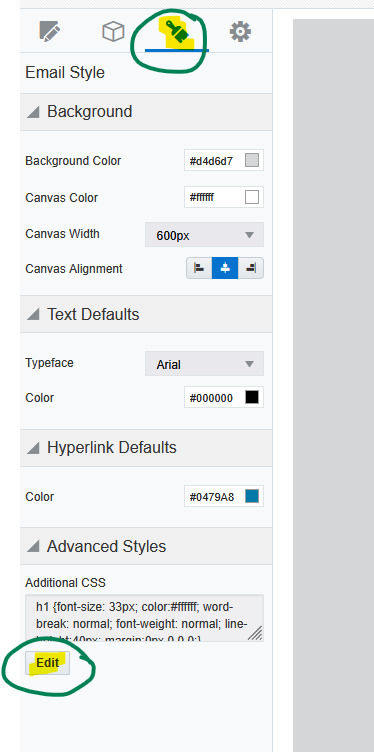
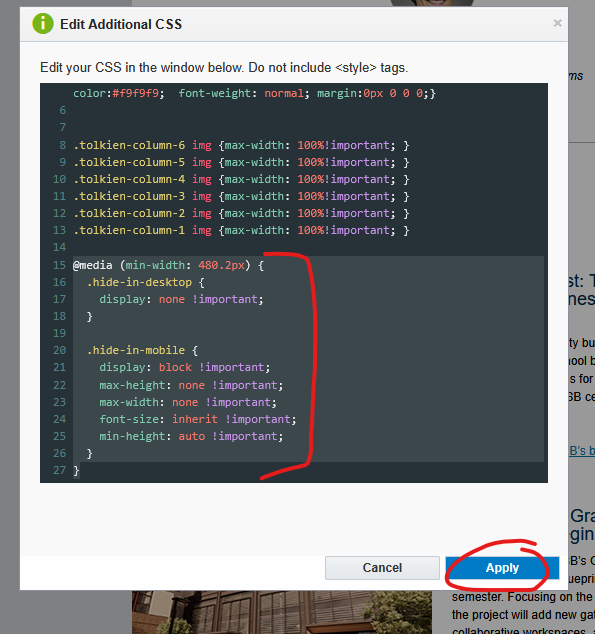
Image Columns Overlap on Tablet Issue (Outlook)
...
The web team is working on implementing this fix on all templates starting in Dec 2025, but if your email doesn't have this built in, you can easily add a manual fix.
- Go to the paintbrush icon in the left sidebar, and under "Advanced Styles" click the "Edit" button.
- Inside the additional CSS, paste in the following code, then click "Apply"
| Code Block | ||||||
|---|---|---|---|---|---|---|
| ||||||
.tolkien-column-6 img {max-width: 100%!important; }
.tolkien-column-5 img {max-width: 100%!important; }
.tolkien-column-4 img {max-width: 100%!important; }
.tolkien-column-3 img {max-width: 100%!important; }
.tolkien-column-2 img {max-width: 100%!important; }
.tolkien-column-1 img {max-width: 100%!important; }
|
...