
Access and Training
WSB faculty and staff outside of the web team do not have access to edit website pages. Faculty and staff can be granted access to edit events, blogs, and advisory boards. Training is required before an individual is granted access to edit any of these types of content. Only the web team has access to edit Pages to ensure accessibility, UX, and brand standards are being met.
If you would like to request WordPress access for yourself or a member of your team, you can can submit a web ticket to request training.
In your request, please provide the following information about the person who needs training:
- First and last name
- Email address
- NetID (this is not a number)
- Status (student employee, staff, or faculty)
- Dept/center/program
- Type(s) of content to edit (events, blog, advisory board)
Logging in
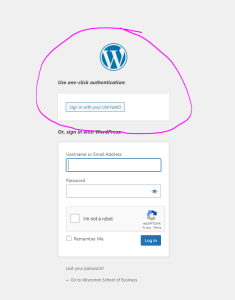
Go to https://business.wisc.edu/wp-admin and click Sign in with your
...
UW NetID.
...
UW's NetID Single Sign On (SSO) system is hooked up, so you will login using Duo authentication.
Typing your Net ID and the associated password on this login page will not work.
Trainings & Documentation Links
- Add/Edit Events
- Add/Edit Blog Posts
- Add/Edit Advisory Board Members
- WordPress Media Library
- Add/Edit Newsroom Posts (MSC and AR team members only)
- Add/Edit Media Mentions (MSC team members only)