
-
Created by
 Mia Bentel on Jun 15, 2026
3 minute read
Mia Bentel on Jun 15, 2026
3 minute read
Also known as: lazyload video, youtube video
Description
A video component that displays a youtube video on the page.
Design
Example 3 |



Anatomy
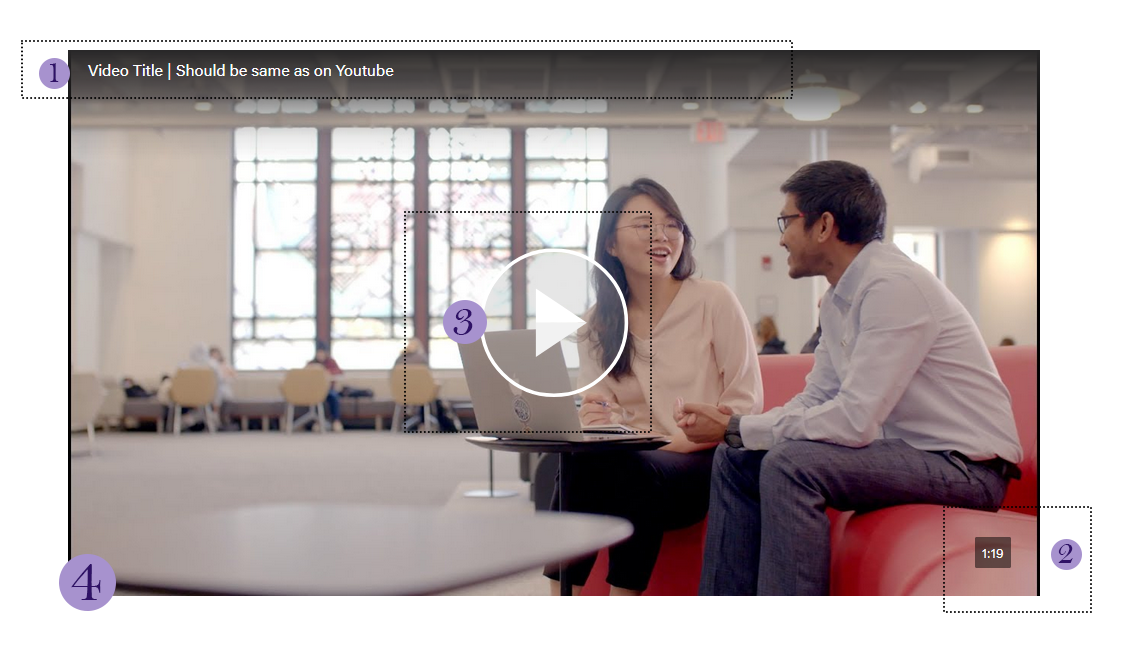
- Video Title (required) - the same as the title on YouTube. Just copy and paste it directly.
- If the title is really long, you can shorten it a bit and remove redundant words like "Wisconsin School of Business" or "Wisconsin MBA" at the end, since the website adds this context.
- Video Length (optional, recommended) - type the video length in m:ss format (eg, "2:15"). Displaying this encourages users to watch the video by telling them the time commitment right away.
- Play Button Color (optional) - defaults to "Light Play Button" which is white. If the video image is mostly white, you should use the "Dark Play Button" (gray) option instead. If the video image is in black and white, you can also use the "Red Play Button" option, but this option should be used sparingly.
- Image/Thumbnail. The video thumbnail that youtube uses will be loaded in by default.
- Image Override (optional) - If you don't like the youtube thumbnail, you can add an image here. It must be the same ratio as the youtube thumbnail, at 1176x662px (or another size at a 16:9 ratio).
- Alt Text (required)- add alt text for the image here. Not required if the alt text is already on the Image Override.
Intro/Footer fields
Most blocks come with an optional section title/header, an intro paragraph, a footer and footer link. Use these as needed. Many uses of videos do not include any of them.
Use When
- Embedding a youtube video directly onto a page, article, or spotlight
Editorial Guidelines
- Shorten the youtube video title around ~50 characters so that the whole thing is visible on mobile screen sizes.
- This is not required, just preferred.
Design Assets Needed
Images
Image Override (optional)
- Dimensions: 1176x662px (or another size at a 16:9 ratio).
- Keep in mind the location of the play button