
-
Created by
 mkcummins, last updated by Mia Bentel on Aug 11, 2026
3 minute read
mkcummins, last updated by Mia Bentel on Aug 11, 2026
3 minute read
Also known as: aside callout
Description
The aside is a snippet of text that appears in the margins of articles/posts.
Design
Person with photoDesktop view
Tablet and mobile views
Source: A Banner Year: WSB Releases Employment Outcomes for Undergraduate Class of 2023 | Statistic/rankingDesktop view
Tablet and mobile views
Source: A Banner Year: WSB Releases Employment Outcomes for Undergraduate Class of 2023 |










Use When
- Displaying sidenotes or other supplemental content
- Adding a ranking/statistic to an article
- Including the photo/name of someone mentioned in the article
Do not use when:
- There are already 3 asides in the article
- There is another aside within one paragraph
- Displaying a long chunk of text (more than 100 characters)
Editorial Guidelines
Follow our general Web Copy General Guidelines in addition to the following:
- 100 characters or less- keep copy as short as possible.
- This is total - including the heading, subtitle, and copy.
Design Assets Needed
Images
1 photo (optional)
- Dimensions: Any square image, typically 266x266px
- Note that for the Image - Person option, the component will add a circle crop.
Implementation
Anatomy / ACF Fields
When using the Aside, in most cases you don't want to use all the fields at the same time, as the content will get too long.
Type: Image Icon or Image Person
The only difference between Icon and Person is that the Image - Icon Type adds the yellow bars to the top and bottom.
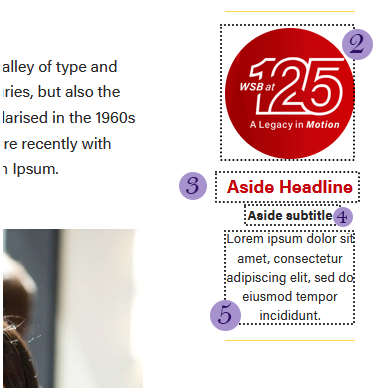
- Placement: Left or Right. Choose whether the aside is on the left on right side of the article.
- Visual (optional) - the photo for the aside. Note that the photo will automatically be cropped to a circle.
- Headline (optional)
- Subtitle (optional)
- Copy (optional)
Type: Ranking
This is a mini version of the Rankings block.
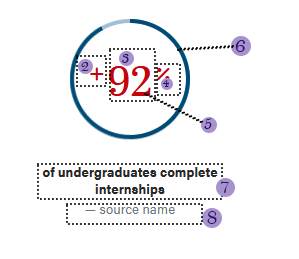
- Placement: Left or Right. Choose whether the aside is on the left on right side of the article.
- Number Prefix
- Number
- Number Suffix
- Number Color
- Rankings Style - Standard or Circle. Circle should only be used for percentages
- Statistic
- Source
Dev Notes
Please note that in the ACF field under Type, you will see statistic : Image - Icon, as it use to read statistic : Image - Statistic. I'm unable to change the first statistic as it will remove all the fields in the block in the editor. Also, In the SCSS file, Image - Icon field will be called callout-statistic.