
| Info | ||
|---|---|---|
| ||
This is a new feature of the website that isn't fully set up yet. The following documentation is for our pilot users. Please contact the web team if your Faculty Department is interested in setting up Research Seminars on the website. |
| Table of Contents |
|---|
Training and Access
...
- Subject line: "Research Seminars WordPress Access"
- Your first and last name
- Your netID (note – this is not a staff/student your username, not your ID number)
- Your status (student employee, staff, or faculty)
- Which dept/program you work for
...
- The date (but not the time) of the seminar.
- The Title (Topic) of the seminar.
- The Speaker Name.
- The Speaker's affiliation/school. (optional)
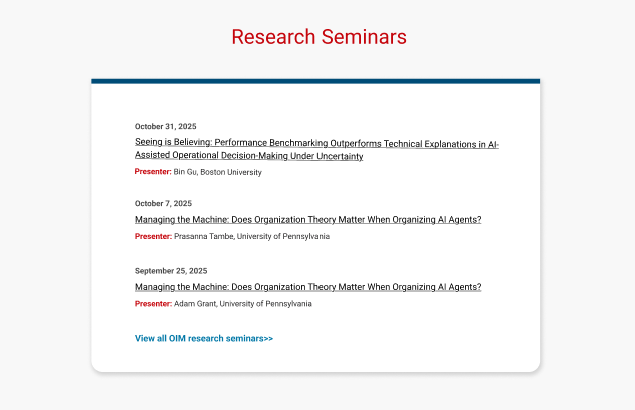
The Seminar Page is where the details of each seminar are displayed. Your department may not have a need for these additional details, and you can leave them blank.
...
- The Department of the seminar.
- The Title (Topic) of the seminar.
- The Speaker Photo (optional)
- The Speaker Name.
- The link to the Speaker's profile (optional)
- The Speaker's affiliation/school. (optional)
- The date of the seminar
- The time of the seminar (optional- set to 12am if you don't want it displayed)
- The location of the seminar (optional)
- A registration link to the seminar, which is automatically hidden once the date has passed. (optional)
- The description for the seminar (optional)
- A link to the seminar topic's paper (optional)
- A link to the recording of the seminar (optional)

Add a New Seminar
- Navigate to Research Seminars in the left menu. It should be at the bottom.
- If you don't see Research Seminars, you will need to request seminar editing access from the web team.
- Click Add New Item (see the two locations for this button in the screenshot below)
...
- Similar to creating a seminar, navigate to seminars and choose yours from the list or use the search to find it.
- Hover over the name of the seminar to see options for editing or deleting your seminar.
Unpublish
...
a seminar
To remove a seminar from the listing on our website, but keep a draft of the seminar page for future reference, you can unpublish the seminar.
...