
-
Created by
 mkcummins on Jul 15, 2026
2 minute read
mkcummins on Jul 15, 2026
2 minute read
Also known as: gray banner, program at-a-glance facts
Description
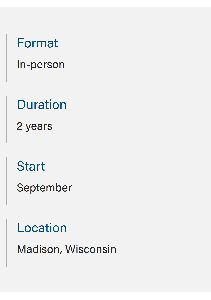
A simple banner that displays "at-a-glance" key facts about the program
Design
Desktop

Mobile
Use When
- Near the top of program home pages to give the user quick "at-a-glance" facts so they know right away what type of program it is
Editorial Guidelines
Follow our general Web Copy General Guidelines in addition to the following:
- Facts should be consistent across programs to make it easy for users to compare programs
- Facts typically used: Format, Duration, Start, Location
Implementation
- Add WP Group block.
- Add these spacing classes to the Additional CSS Classes field under Advanced: "pt-5 pb-3 my-6"
- Select gray background color under Styles tab.
- Within Group block, add WP Columns block. In the right menu, set columns to 4 and make sure "stack on mobile" is turned on.
- In each column, in the Additional CSS Classes field, add "border-start border-2" to get the left side border.
- In each column, add an H3 and a paragraph.