-
Created by
 Sonia Villa, last updated by Erica McConnaughey on Apr 17, 2026
2 minute read
Sonia Villa, last updated by Erica McConnaughey on Apr 17, 2026
2 minute read
Also known as: news hero, news banner, full-width news story
Description
A block that spans full-width and displays a featured News post or Update Magazine post headline and image at the top of the Newsroom page.
Design

Use When
- Featuring a news story at the top of the Newsroom page.
Editorial Guidelines
- No copy needed for this hero, since all copy is pulled in from the news story.
- "Featured News" microtitle is always displayed
- The featured story's headline is pulled into the hero card. If you need to adjust the headline, you will have to do that on the story itself and it will be updated in this hero.
Design Assets Needed
Image override (recommended)
- This block feeds in the featured photo from whatever news story is shown. Many times, this photo needs to be replaced in the hero so that important content is visible for all screen sizes.
File specs:
- Provide a high-quality jpeg or png image with standard dimensions (2400px x 1600px)
- Ensure important content is contained within the top 700px of the image.
- The image will get cropped at the bottom on large and x-large screens.
- Important content must be centered horizontally
- The image gets cropped on the left and right for mobile screens (up to 400px per side).
Implementation
ACF Fields
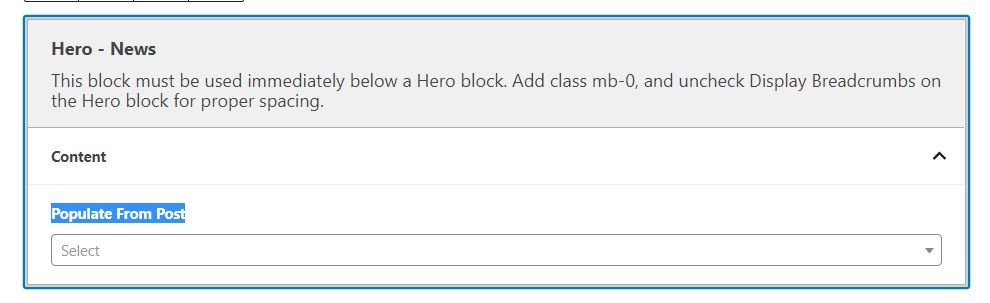
- Use the dropdown to select a post to feature. Start typing in the title of the post to help narrow down the list in the dropdown menu.
Override Featured Image
- If set to No (default), the block will pull in the Post's featured image.
- Toggle to Yes if you want to manually select a different image to use for this block.
- Use case: If the featured image for the featured story has text, is a collage, or gets cropped weirdly/doesn't look good in this block, toggle to Yes and select the preferred image.
Hero Image
- This field only appears if the override image field is toggled to Yes.
- Use this field to upload/select the image to display in the block.
- The image should be at least 2400px x 1600px
- Note: this will not change the featured image for the Post itself
Additional Notes
Make sure you follow the additional instructions on the Hero - News block – "This block must be used immediately below a Hero block. Add class mb-0, and uncheck Display Breadcrumbs on the Hero block for proper spacing."